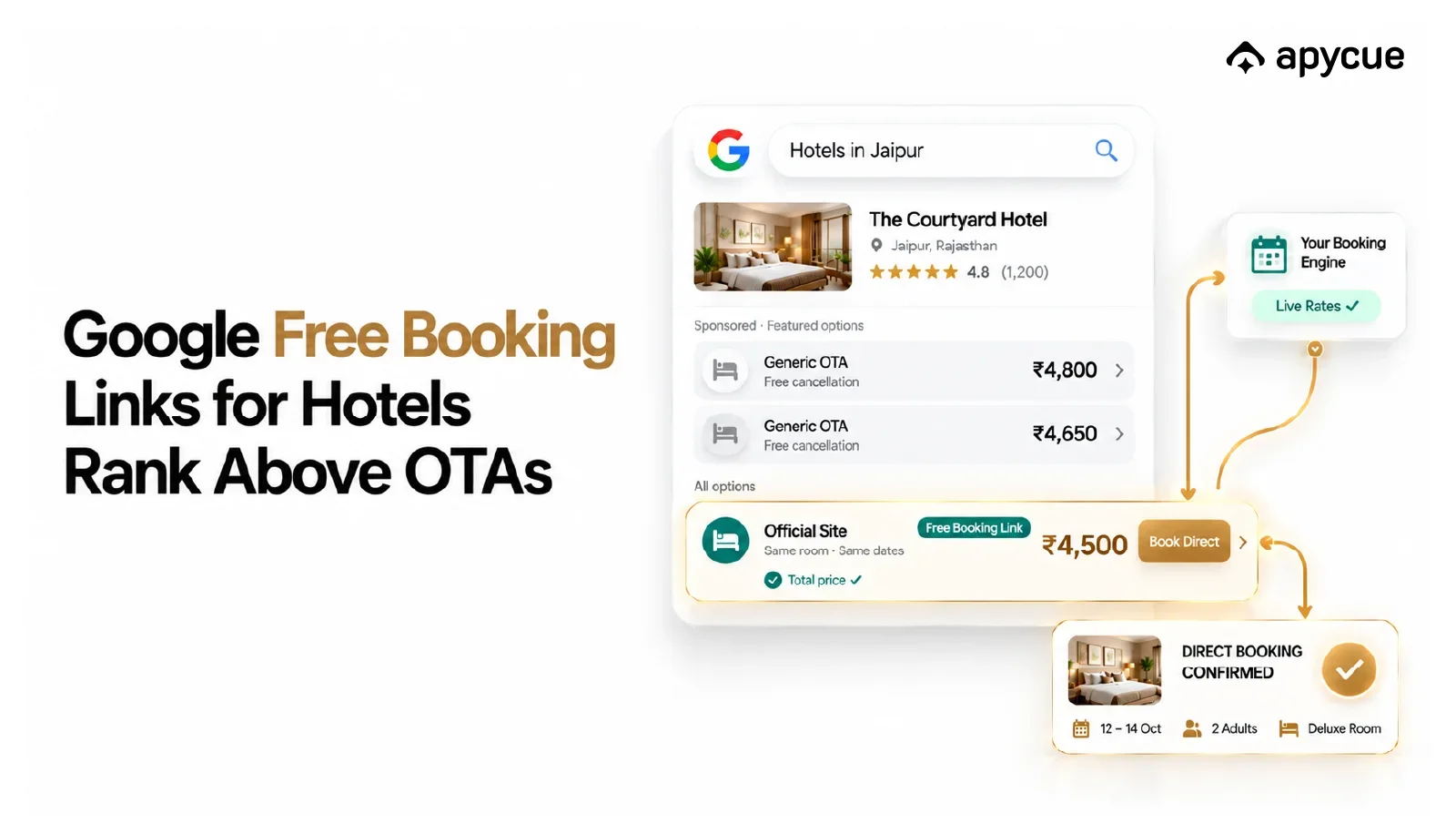
When a traveler searches for a hotel on Google, a list of properties appears with rates. Some of those rates link to Booking.com. Some link to Expedia. But a few link directly to the hotel's own website.
That last one is the Google free booking link.
It costs nothing per click. It sends the guest straight to your property. And most hotel owners have no idea it exists.
This guide explains what it is, whether your hotel qualifies, how to set it up, and what actually determines whether you rank above the OTAs.
What is a Google Free Booking Link?
When someone searches for a hotel on Google, they see a panel showing room rates from multiple sources. These are called hotel booking links.
Some of those links are paid ads. OTAs bid for those positions, which is how Booking.com or Expedia appear prominently. They pay Google every time someone clicks.
But Google also shows a set of organic booking links. These are unpaid. Your hotel can appear in that list simply by feeding accurate rates to Google and meeting a few basic requirements.
If a guest clicks your free booking link, they land on your booking page. No commission paid. No OTA in the middle. Just a direct booking.
The catch? Most hotels are not set up to appear in these links at all. Not because they are ineligible, but because no one told them the option exists.
Is Your Hotel Set Up for Google Free Booking Links?
We check whether your hotel is connected correctly, find what is missing, and show you exactly what to fix.
Book a Free CallHow Google Free Booking Links Work
Google free booking links appear inside the hotel results panel, labeled as organic listings. They sit alongside paid Hotel Ads results. When a traveler compares rates and clicks your direct link, they go straight to your booking page without going through any OTA platform.
The listing shows your live room rate pulled in real time from your booking engine. If your rate matches what the guest pays at checkout, and your page loads well on mobile, you are in a strong position to rank. The entire system runs on data accuracy. Google rewards hotels that show honest prices and deliver a smooth booking experience.
For a hotel paying 15 to 25 percent OTA commission on every booking, even a fraction of those bookings shifting to direct can change the numbers significantly. That is why getting this right matters. If you want a broader picture of how to reduce OTA dependency, the complete guide to getting more direct bookings covers all the channels that work together.
What Does Your Hotel Need to Be Eligible?
Google does not let you add your hotel directly to free booking links the same way you claim a Google Business Profile. The connection goes through a technical layer called a connectivity partner.
Here is what eligibility actually requires:
A verified Google Business Profile
Your hotel must have a claimed and verified Google Business Profile. This is free and takes a few days to complete. It is the foundation. Without it, nothing else works. Fill out every field completely: hotel name, address, phone number, website URL, photos, check-in time, and amenities. A complete profile performs better.
A live price feed connected to Google
Google needs to see your room rates in real time. This means your booking engine or property management system must send rate data to Google through an approved integration. You cannot manually enter your rates. The feed has to update automatically whenever you change prices, availability, or restrictions.
A bookable landing page
When a guest clicks your free booking link, they land on a page where they can complete a booking. That page must load fast, work on mobile, and show the same rate that Google displayed. If there is a mismatch between the displayed rate and the checkout price, your ranking suffers. If you are still evaluating whether your current setup is sufficient, read our guide on whether you need a booking engine for your hotel website.
Accurate pricing, including all taxes and fees
Google checks whether the price it shows matches what guests actually pay when they complete the booking. If your displayed rate excludes mandatory charges and the final checkout price is higher, that counts against you. Always show the total price, including all applicable taxes and fees.
How to Set Up Google Free Booking Links: Step by Step
Step 1: Claim and verify your Google Business Profile
Go to google.com/business and search for your property. If it already exists as an unverified listing, claim it. If it does not exist, create it. Fill out every section completely and add recent photos. Google uses the information here to match your property to the Hotel Center account that your booking engine creates.
Step 2: Connect your booking engine to Google
Your booking engine needs to support Google Hotel integration. Ask your booking engine provider directly: "Are you a Google connectivity partner, and can you push our rates to Google free booking links?" If your current provider supports it, this is usually a setting to activate. If they do not support it, you will need to either switch providers or add a channel manager that does. This is the step most hotels skip, which is why their direct rates never appear on Google.
Step 3: Verify your Hotel Center account
Once your connectivity partner activates the Google feed, your hotel gets a Hotel Center account. This is a dashboard where you can see performance data for both paid and free booking links. Log in and confirm your property is mapped correctly. A common problem is that the property in Hotel Center does not match the Google Business Profile, which breaks the link entirely.
Step 4: Confirm your rate feed is live
Ask your connectivity provider to confirm the feed is active. You can also test it yourself: search your hotel name on Google. If you see rates with a link to your direct booking page, the feed is working. If only OTA rates appear, your feed is either inactive or your rates are not being accepted by Google.
Step 5: Audit your booking page on mobile
The majority of hotel searches happen on mobile devices. Google checks your landing page's mobile performance as a ranking input. Use Google PageSpeed Insights and run your booking page URL. Aim for a mobile score above 70. A slow booking page not only hurts your ranking, it loses guests who do click through. Our post on why hotel websites fail to convert direct bookings covers exactly what to fix.
Not Sure If Your Booking Page Is Ready?
Get a quick audit of your hotel website and booking setup to see what is holding back your direct bookings.
Book a Free CallWhat Determines Your Ranking in Google Free Booking Links?
Once you are set up, the next question is: why do OTAs rank higher than you in the free links? Google uses four factors to rank free booking links. Understanding these is the difference between appearing at the top and not appearing at all.
Price accuracy
This is the most important factor. Google tracks whether the price it shows matches what guests actually pay when they complete the booking. If your booking engine displays one rate and the checkout total is higher, Google penalizes your listing over time. Always configure your booking engine to display the total price including all mandatory charges. This is also better for your guests, since there are no surprise amounts at checkout.
Rate competitiveness
Google wants to show the best deal to the traveler. If your direct rate is higher than the OTA rate for the same room, Google will rank the OTA above you. Rate parity is the minimum you need to maintain. Offering a small direct booking benefit, like free breakfast or a late checkout, can push guests to choose your link even when the price is identical. This connects directly to how hotel dynamic pricing affects your direct bookings and why parity management is an ongoing task, not a one-time setup.
Landing page experience
When a guest clicks your free booking link, what do they find? If your booking page is hard to navigate, shows unclear availability, or takes more than three seconds to load on a mobile connection, Google takes note. A clean, fast, mobile-friendly booking page is not optional. It is a ranking signal.
Consumer preference signals
Google looks at historical data on which links travelers choose and complete bookings through. A new listing has no history, so it typically starts lower in the results. As guests use your link and complete bookings, your ranking improves. This is why setting up free booking links as early as possible matters. The sooner you start, the sooner Google builds positive signals for your property.
Why Most Hotels Miss Out on Free Booking Links
The same patterns appear across hotels around the world:
Their booking engine does not support Google connectivity
Many hotels use older booking engines or simple reservation forms that have no Google integration. The solution is to upgrade to a provider that supports it or add a channel manager in between. This single step unlocks both free booking links and Google Hotel Ads.
They never set up Hotel Center
Hotel Center is separate from Google Business Profile and Google Ads. You can have all three running and never connect them. The connection happens through your booking engine provider, and most providers will not set it up unless you ask.
Their rates are not in parity with OTAs
Some hotels show higher rates on their own websites because of markup, outdated pricing, or OTA-exclusive discounts running in the background. Google sees this discrepancy and ranks the cheaper OTA rate above your direct rate. Running regular rate parity checks is part of keeping your ranking healthy.
Their booking page is too slow
A website that scores poorly on mobile performance will not rank above a major OTA. Improving page speed alone has helped hotels move from invisible to visible in Google's free links. If your booking page is slow, this is often the fastest win available to you.
Google Free Booking Links vs Google Hotel Ads: What is the Difference?
Both appear in the same hotel results panel on Google. The difference is how you get there and what it costs.
Google Hotel Ads are paid. You bid for visibility and pay per click. Your position in the paid results depends on your bid amount and your landing page quality. OTAs spend heavily here, which is why they often appear at the top of the paid section.
Google free booking links are organic. There is no bidding and no cost per click. Ranking is based entirely on price accuracy, rate competitiveness, and landing page experience. An hotel with a well-maintained booking engine and accurate pricing can rank above OTAs in the organic section without spending anything on ads.
Running both together is an option. Some hotels use free booking links to establish organic presence while testing paid Hotel Ads for additional reach. For a full walkthrough on setting up the paid side, read our Google Hotel Ads setup guide for hotels.
Want to Show Up on Google Before Your Competitors Do?
Apycue helps hotels connect their booking engine to Google, fix their rate feed, and start capturing direct bookings.
Book a Free CallCommon Mistakes to Avoid
Showing rates without all fees included: Your displayed rate must include all mandatory charges. Showing a lower rate than what guests pay at checkout is a price accuracy violation and will hurt your ranking over time.
Not checking Hotel Center regularly: The rate feed can break silently after a system update or provider change. Check Hotel Center at least once a month to confirm your rates are live and the property mapping is still correct.
Ignoring rate parity: If you are running OTA-exclusive discounts, your own rates will appear higher than the OTA rates on Google. Parity audits should be part of your regular revenue management routine.
Setting up and forgetting: Google free booking links are not a one-time task. Rate feeds, landing pages, and parity all need ongoing attention. Treat them the same way you treat your OTA listings. If guests drop off before completing a booking, read our guide on recovering hotel booking abandonments to understand where the leaks are and how to fix them.
How Apycue Helps Hotels Get Set Up on Google Free Booking Links
Most hotels lose time trying to figure out which booking engine supports Google connectivity, why their rate feed is not showing up, or why their direct rate is ranking below OTAs. These are not complicated problems, but they require someone who knows exactly where to look.
Apycue is built specifically for hotels that want to reduce OTA dependency and grow direct bookings. We help hotels get their Google free booking links active, make sure the rate feed is accurate and live, and audit the booking page so it converts the clicks that come through.
Beyond the technical setup, Apycue's tools help hotels build a complete direct booking system: a fast, conversion-ready hotel website, WhatsApp automation to capture inquiries before they go to an OTA, and guest communication tools that bring past guests back without paying commission again.
If your hotel is currently invisible in Google's organic booking results, or if your direct rate is losing to OTA rates on the same search page, Apycue can help you fix that.
Frequently Asked Questions
Google free booking links are unpaid slots in Google's hotel search results that let travelers book directly through a hotel's own website. Unlike paid Hotel Ads, there is no cost per click. Your hotel's direct rate appears alongside OTA rates, and when a guest chooses your link, they land on your booking page with no commission going to any third party.
Yes. Google cannot pull your rates manually. You need a booking engine or channel manager that is connected to Google as an approved connectivity partner. This is what sends your live room rates and availability to Google automatically. Without this technical connection, your hotel will not appear in the free booking links, even if you have a verified Google Business Profile.
No. Free booking links are separate from paid Hotel Ads. You do not need to run ads or set any bids to appear in the organic listing. However, both use the same technical setup: a verified Google Business Profile and a live rate feed through a connectivity partner. Once the feed is active, your hotel is eligible for both paid and free placements.
The most common reasons are a broken or inactive rate feed, a mismatch between the Google Business Profile and the Hotel Center property mapping, prices that include errors or do not match the checkout total, and a booking landing page that fails Google's performance checks. Log in to your Hotel Center account and check for errors in the property status and rate feed section.
Google uses four main factors: price accuracy (does the displayed rate match what guests actually pay at checkout), rate competitiveness (is your direct rate at least equal to OTA rates), landing page experience (speed, mobile performance, ease of booking), and historical consumer preference signals. Bids and your commercial relationship with Google have no effect on free booking link ranking.
If your booking engine already supports Google connectivity, activating the feed typically takes one to three days. If you need to switch providers or set up a new channel manager, the process can take one to two weeks depending on the provider's onboarding timeline. Google Business Profile verification, if not already complete, can add another three to five days.
Yes. Google's free booking link ranking does not favor OTAs over independent hotels. If your rates are accurate, competitively priced, and your booking page performs well on mobile, your direct link can rank above Booking.com or Expedia for your own property. The key advantage independent hotels have is rate control: you set your own price, and you can always match or beat the OTA rate without asking permission from anyone.
Get More Direct Bookings Without Paying OTA Commission
Apycue helps hotels set up their direct booking channels and keep them performing.
Book a Free CallShare this post